Deleting a site removes it and everything in it from your account. It can’t be undone. So save a copy first, then delete the site from its Delete site tab.
Save a copy before deleting
You have 2 ways to keep the site’s content:
- Download a backup from the site’s Backups tab.
- Export the site from its admin, in Settings → Transfer or Settings → Backups.
Who can delete a site?
The site’s owner can delete it. In a workspace, that is the workspace owner. Admins and members of a workspace can’t delete sites.
Delete a site
In the dashboard, open the site’s Delete site tab. You can also use Delete site in the site’s ⋯ menu.
Type the site’s name to confirm. The name is its hyphio.cc address, without
.hyphio.cc.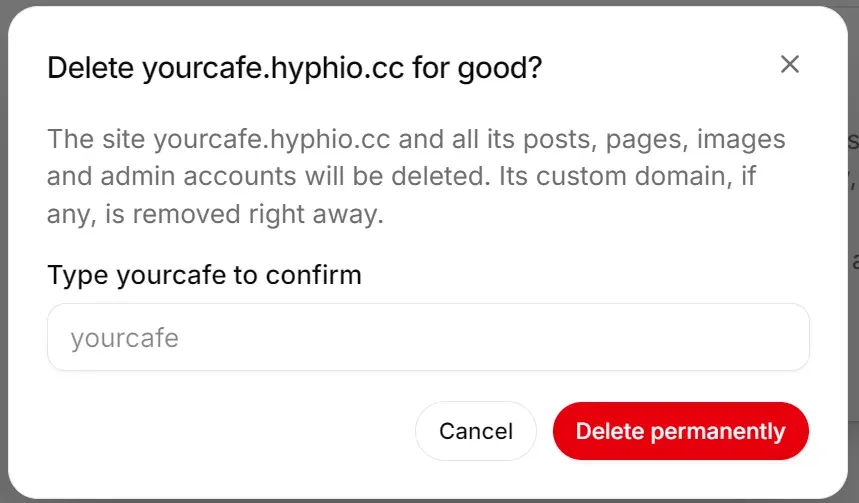
Type the site's name to confirm Click Delete permanently. The site goes offline at once and disappears from your account.
What deleting removes
- Its custom domain is disconnected right away. Remove the DNS record for Hyphio where you manage the domain.
- Its plan is canceled, so it isn’t charged again.
- Its content is erased for good within 24 hours: posts, pages, images and admin accounts.
If 2 sites you deleted are still being removed, you can’t create a new site for a few hours.
Other ways to stop a site
Deleting is only one way to stop running a site. Pick the one that matches what you want:
| You want to | Do this | What happens |
|---|---|---|
| Stop the site for good, now | Delete it | Offline at once, data erased within 24 hours |
| Stop paying at the end of the paid period | Cancel plan on the Billing page | Runs until the period ends, then paused, deleted 7 days later unless paid |
| Let a client own and pay for it | Hand it over | Moves to the client’s account with its domain and content |
| Keep it but hide it while you work | Turn on Hide from search engines in Configuration | Stays online, search engines leave it out |
| Move it to another host | Export it from the admin (Settings → Transfer), then delete it | The .emdash package imports on any EmDash host |
Stopping payment is not deleting. If you simply stop paying, the site is paused first, then deleted 7 days later, as the Billing page explains. Delete a site yourself only when you are sure you don’t need it.
Questions about deleting
Will I be charged again? No. Deleting a site cancels its plan, so it isn’t renewed.
Does deleting a site affect my other sites? No. Each site has its own database and storage.
Related pages
- To find the DNS record that points to Hyphio, see Connect your domain.
- To import an
.emdashpackage into another Hyphio site, see Move from another EmDash site. - To ask before you delete, see Get help.