Hyphio runs your EmDash site on Cloudflare. Hyphio takes care of the parts that usually go wrong when a site runs on its own: plugins, updates, backups, sign-in, bots and email abuse. Your mailbox and the people you invite to your site stay in your hands.
Compared with running EmDash yourself
| Hyphio | Self-hosted on Cloudflare Workers | Self-hosted on a VPS | |
|---|---|---|---|
| Server to patch | None | None | Yours: OS, Node.js, SSH, firewall |
| HTTPS and DDoS protection | Cloudflare, set up for you | Cloudflare, you set it up | You set up certificates. DDoS only if you put a CDN in front |
| EmDash updates | Hyphio updates every site after automatic tests | You follow releases and redeploy | You follow releases, redeploy and restart |
| Plugins | A tested set, off by default. Installing others is blocked | Anything you install | Anything you install, running in the same process as your site |
| Admin sign-in | Email link or passkey, no password | EmDash’s default: passkey, or email link once email is set up | Same as Workers |
| Who can set up the first admin | Only Hyphio’s deploy, so nobody can claim a new site | Whoever opens the setup page first | Whoever opens the setup page first |
| Backups | Every night, kept 35 days, locked against deletion for 30 days, restore from the dashboard | You set them up | You set them up, often on the same server |
Vulnerability scanners (/wp-admin, .php, /.env…) |
Answered 404 before EmDash | Reach EmDash | Reach EmDash |
| Bulk AI and SEO crawlers | Slowed down automatically when they drive your site’s cost up | You watch and block them | You watch and block them |
| Email abuse (sign-in links, invites, form notifications) | Sending limits per visitor, per site and per recipient | No limits unless you add them | No limits unless you add them |
| Passwords and keys | Stored as encrypted Cloudflare secrets, set by the dashboard | Up to you | Often in an .env file on the server |
In short: when you host EmDash yourself, the server, updates, backups and bots are yours to handle. On Hyphio, that work is already done for you.
What Hyphio does
Hyphio protects your site in layers, from the sign-in page to the platform it runs on.
Sign-in has no password
You sign in to your site’s admin with a link sent to your email. There is no password to guess or leak.
Each new site is created with your Hyphio account’s email as its admin. EmDash’s setup page answers only to Hyphio’s deploy. So nobody can make themselves admin of a new site before you.
You can also sign in with a passkey, meaning a fingerprint, face or security key, once you have added one in the admin. The switch is in the site’s Configuration tab. A passkey belongs to one domain, so after you connect your own domain, add a new passkey there. With your own Turnstile keys, the sign-in page also checks that each request comes from a person.
Plugins are tested and off
Each site comes with a set of plugins Hyphio has tested, all off until you turn them on. Installing other plugins from the marketplace is blocked, so no unknown code runs on your site.
Hyphio updates EmDash for you
Hyphio follows EmDash releases. Each new version is tested automatically, then every site is rebuilt with it. You don’t need to do anything.
Backups happen in 3 ways
- Every night by Hyphio. Your content and images are copied to separate storage and kept 35 days. For the first 30 days, nobody can delete or overwrite a backup, not even with a leaked key. The site’s Backups tab lists them so you can download or restore one. Before a restore, your site is backed up again first.
- By EmDash. EmDash’s own backups are on for every site. Download them in the admin, under Settings → Backups.
- By Cloudflare. The database keeps 30 days of history and can be rolled back to any minute. If you need that, open a request on the Support page.
Bots and abuse are blocked
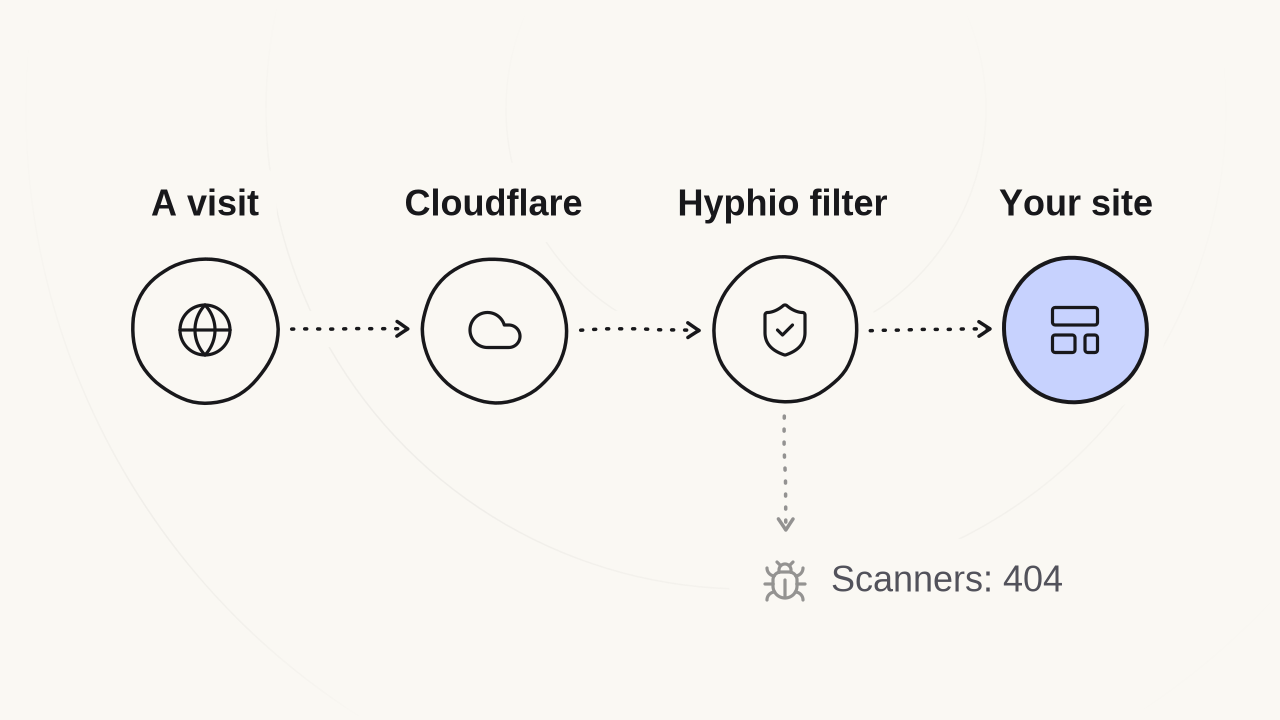
- Vulnerability scanners. Requests that look for other platforms’ weak spots (
/wp-admin,.phpfiles,/.env) get a plain 404 before they reach EmDash. - Comments. Comments on blog posts are checked by Cloudflare Turnstile. Turnstile tells people from bots without a puzzle. Hyphio turns it on for every site with comments and keeps it working when you add your own domain.
- Bulk AI and SEO crawlers. When they drive your site’s usage up, Hyphio slows them down (429) on your public pages until usage is back to normal. Your visitors and the admin aren’t affected.
- Email. When your site sends email through Hyphio, sign-in links, invites, address-change notices and form notifications have daily limits. So nobody can use your site to flood an inbox.
Handover locks out the old team
When an agency hands a site over without keeping access, every other editor is locked. Other API tokens and pending invites are deleted, and webhooks are removed. Backups taken before the handover aren’t offered to the new owner, since they hold the former team’s accounts.
Sites run on Cloudflare
Your site runs on Cloudflare Workers: no server, no open ports, HTTPS and DDoS protection included. Images and files are stored in Cloudflare R2. Your content is stored in Cloudflare D1.
What stays in your hands
- Your email account. You sign in to your site by email link and to the dashboard with Google. So whoever controls your mailbox controls your site. Turn on two-step verification for that account.
- Who you invite. Every editor and admin you add can change your site. Remove the people who no longer need access in the admin, under Users.
- Plugins you turn on. Turn on only the plugins you use. Features you don’t use are only more to look after.
- Your own SMTP. If you send email through your own server, its account and limits are yours.
What Hyphio doesn’t claim
Hyphio has no security certification such as SOC 2, and no independent penetration test yet. To run your site, Hyphio’s systems can deploy, back up and restore it. This page will be updated when that changes.
Report a problem
If you find a security issue, email hello@hyphio.com with the steps to reproduce it. Please don’t test against sites that aren’t yours.
Related pages
- To understand how your site runs, see How Hyphio works.
- To download or restore a backup, see Backups and restore.
- To turn plugins on or off, see Plugins.
- To add a passkey or an editor, see Sign in to your site’s admin.